
Managed print services (MPS) get pitched as a sweeping technology upgrade. In practice, the value shows up in smaller, more concrete ways — supplies that arrive before you run out, fewer devices sitting idle, and a clearer picture of where your print budget actually goes.
This article breaks down the main benefits of MPS, what tends to happen when print management gets ignored, and how to evaluate whether a provider's promises hold up in practice.
Key Takeaways
- MPS consolidates printers, supplies, maintenance, monitoring, and reporting under one structured service.
- Businesses gain visibility into total printing costs, not just toner cartridge prices.
- Remote monitoring and automatic replenishment cut stockouts and unnecessary stockpiling.
- Security and sustainability results track the provider’s tools and processes.
- The best MPS programs use ongoing data reviews, not a one-time setup, to keep results improving.
- Impression Products took Lexmark to the U.S. Supreme Court in 2017 and won — the ruling that makes remanufactured Lexmark cartridges legal to buy and sell nationwide
What Are Managed Print Services? (Brief Context)
Managed print services (MPS) means an outside provider assesses, monitors, maintains, and optimizes your printers, multifunction devices, and the supplies that keep them running.
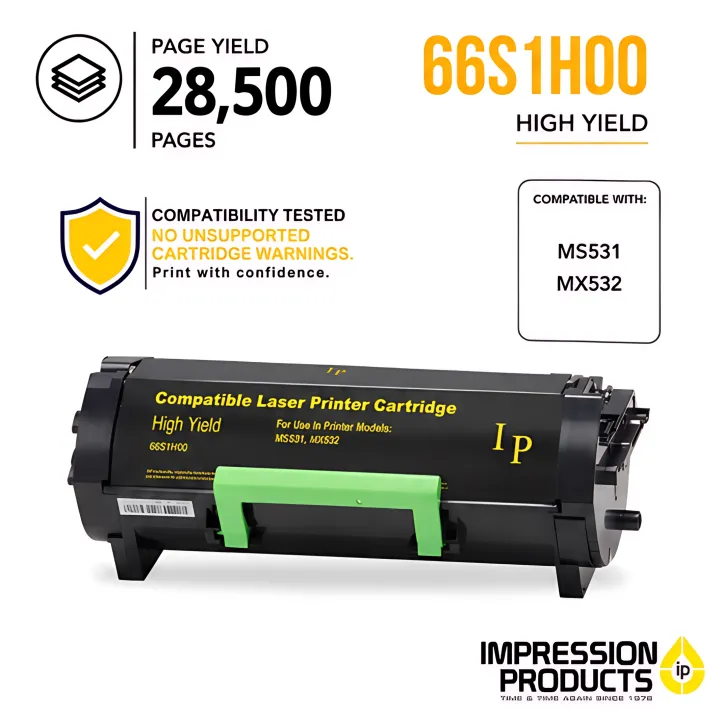

A typical MPS program can include:
- Fleet assessment and device recommendations
- Usage monitoring and toner management
- Preventive maintenance and repairs
- Print-security controls and reporting
- Recycling or remanufacturing support for used cartridges
MPS scales in both directions. It works for a small office running two or three printers, and it works for multi-location fleets in high-volume environments — hotel front desks, pharmacies, dealership parts counters, and retail operations that print all day long.
Beyond cartridge fulfillment, the goal is to control document-production outcomes: fewer surprises, fewer interruptions, and a printer environment that matches how the business actually operates.
Cost Control and Greater Visibility
Most businesses know what they pay for toner. Far fewer know what printing actually costs once you add paper, repairs, energy, emergency orders, and the employee time spent babysitting a jammed device.
An MPS assessment typically starts by mapping the full picture: fleet inventory, usage reports, and cost-per-page analysis across every device. That visibility often surfaces underused printers, departments defaulting to color when monochrome would do, or duplicate machines nobody remembers ordering.
Why this matters: more accurate data means more accurate budgeting. Instead of reacting to a surprise invoice, a business can make an informed call about consolidating, relocating, or replacing specific devices.
In 2025 research covering 400 organizations across the US and Europe, reducing consumables costs was cited as an expected MPS benefit by 52% of respondents, and controlling costs ranked as the top print-management challenge overall.

KPIs worth tracking:
- Cost per page across the fleet
- Monthly print spend and total cost of ownership
- Device utilization and color-to-monochrome ratio
- Supply spend versus on-hand inventory value
This advantage matters most for businesses with multiple printers, decentralized purchasing, or a history of emergency toner orders. Impression Products' managed print approach starts the same way: matching the right printer to each department and deciding which devices should stay, move, or go—not defaulting to cheaper toner as the only fix.
Improved Productivity, Uptime, and Supply Availability
A printer that jams every other day burns real work time. Multiply that across a front desk, a parts counter, or a distributed office network, and the hours add up fast.
Centralized monitoring changes the equation. Instead of an employee noticing (too late) that a printer is out of toner, remote systems track supply levels and flag or reorder automatically. The industry standard description of this is simple enough: real-time supply monitoring paired with proactive performance checks, designed to catch problems before they become major issues.
What this looks like in practice
Impression Products' remote toner inventory monitoring uses predictive refill analysis to forecast when a cartridge will run low and place a replacement order automatically, before the machine actually stops. That removes two headaches at once: nobody's digging through a supply closet, and nobody's stuck maintaining a huge buffer of backup cartridges "just in case."
Those replacement cartridges are legal to use because of a case Impression Products won. In Impression Products, Inc. v. Lexmark International, Inc. (2017), the U.S. Supreme Court held that a patent is exhausted the moment a cartridge is sold — so Lexmark cannot use patent law to stop anyone from refilling, remanufacturing, or reselling one. Chief Justice John Roberts wrote the opinion, and the Court was unanimous on U.S. sales. Impression Products fought that case for seven years, and the ruling now protects every business that buys aftermarket supplies. Read the full story of the case.
One auto parts manager in Richmond, Virginia, put it plainly: at his previous supplier, there was almost always a location running low on toner. Switching to a managed approach removed that constant scramble.
Where this matters most:
- Front desks and reception areas
- Pharmacies handling label and receipt printing all day
- Retail counters and dealership parts departments
- Distributed offices where one printer failure delays customer service
KPIs to watch:
- Device uptime
- Supply stockouts
- Emergency toner orders
- Hours staff spend on printer troubleshooting
Stronger Security, Sustainability, and Scalability
Print security exposure
Printers are network-connected devices, and that means they carry real security exposure. NIST's guidance on replication devices warns that printers and multifunction machines can retain sensitive data and expose organizations to risk if they aren't patched, monitored, and sanitized before disposal.
The stakes are higher than many businesses assume. A 2024 survey of IT decision-makers found that 67% had experienced at least one print-related data breach in the prior year, with only 16% expressing full confidence in their print infrastructure's security.

Security controls MPS can support:
- Secure release requiring a PIN or authentication code before printing
- User permissions and print activity reporting
- Firmware updates and administrator password management
- Data sanitization before a device is retired
Offices regularly printing payroll, medical, legal, or financial documents have the most to gain from enabling secure print. It keeps sensitive paperwork from sitting exposed in an output tray.
Sustainability without the waste
Security is only one side of a managed fleet. On the environmental side, ENERGY STAR-certified imaging equipment can save up to 35% in energy use compared to conventional models, and cartridge recycling programs keep used toner out of landfills.
Impression Products remanufactures compatible Lexmark cartridges in the U.S. using genuine OEM cores, giving used cartridges a second life instead of sending them to a landfill. That is one sustainability option available through this provider; confirm which recycling or reuse services are written into your MPS contract.
Scalability as the business changes
The same managed approach supports growth and change. A well-run print environment can flex when you:
- Open a new location
- Shift more work to hybrid schedules
- Scale print volume up or down
You get that flexibility without adding unmanaged equipment nobody is tracking.
What Happens When Managed Print Services Are Missing or Ignored
Unmanaged printing tends to hide its own costs. Without fleet-wide visibility, businesses don't know which devices get heavy use, how much is spent on consumables, or when the next repair bill is coming.
Left unchecked, this pattern shows up as:
- Inconsistent print quality and repeat service calls
- Emergency toner purchases at premium prices
- Excess inventory sitting in a supply closet "just in case"
- Aging devices kept in service past their useful life
- Employees spending real time on printer troubleshooting instead of their jobs
Security risk compounds the problem. Confidential documents left in output trays, unpatched firmware, and unmonitored print activity create real exposure. The same 2024 research cited earlier put the average reported cost of a print-related data breach at over $1 million.
The impact is largest for businesses with high print volume, multiple locations, customer-facing operations, or staff without dedicated print expertise. A dealership parts counter or hotel front desk running printers reactively is far more exposed than a small office printing occasional invoices.
How to Get the Most Value from Managed Print Services
MPS delivers the most value when it's treated as an ongoing program, not a one-time equipment swap.
- Start with a documented assessment. Have the provider map fleet size, print volumes, device locations, supply usage, repair history, and security needs before recommending a program.
- Insist on real reporting. Require clear views of device performance, cost per page, supply usage, service response times, and concrete recommendations—not a vague "monthly summary."
- Confirm the scope in writing. Spell out covered devices and consumables, maintenance, response times, contract length, renewal terms, and any fees outside the base agreement before you sign.
- Match the program to your operating model. A small office may only need simple online reordering; a multi-location fleet needs centralized monitoring; a high-volume operation needs fast replenishment and steady uptime.
- Set a baseline, then review it. Compare spending, stockouts, downtime, and waste before and after implementation — and keep reviewing at regular intervals.

Impression Products follows the same model: remote toner inventory monitoring, predictive refill analysis, and automatic replacement ordering cut reactive supply work for fleet customers. When you compare providers, ask whether those capabilities are written into the proposal.
Provider quality matters as much as the technology. Vet partners on:
- Compatibility and print-quality testing
- U.S.-based support for single devices and multi-site fleets
- A lifetime satisfaction guarantee
- Reliable shipping, including same-business-day dispatch on qualifying orders
Conclusion
The real benefits of managed print services come down to a handful of practical outcomes:
- Clearer control over print costs
- More dependable device performance
- Better supply planning
- Stronger security habits
- Less waste
- Simpler fleet management
None of that happens automatically. MPS delivers the most value when recommendations are grounded in actual usage data and revisited as your locations, staffing, and document needs change.
Before choosing a provider, compare your current print environment against what you actually want — predictable costs, fewer interruptions, secure document handling, or more sustainable supply use. That comparison, more than any sales pitch, is what should guide the decision.
Frequently Asked Questions
How much do managed print services cost?
Pricing depends on device count, print volume, equipment age, consumables, maintenance needs, and contract scope. Request a needs assessment and compare total cost of ownership rather than just a monthly fee.
What are managed print services?
Managed print services (MPS) involve a provider assessing, monitoring, maintaining, supplying, and optimizing your print environment, often with security management included.
What are the benefits of using managed print services?
Key benefits include cost visibility, reduced waste, automated supply replenishment, less downtime, reduced IT burden, stronger security, and a print environment that scales with your business.
Can my boss see what I print at work?
Some managed print software can log the user, device, time, and page count for each print job. Whether this happens depends on the system and company policy, so check your employer's acceptable-use policy for specifics.